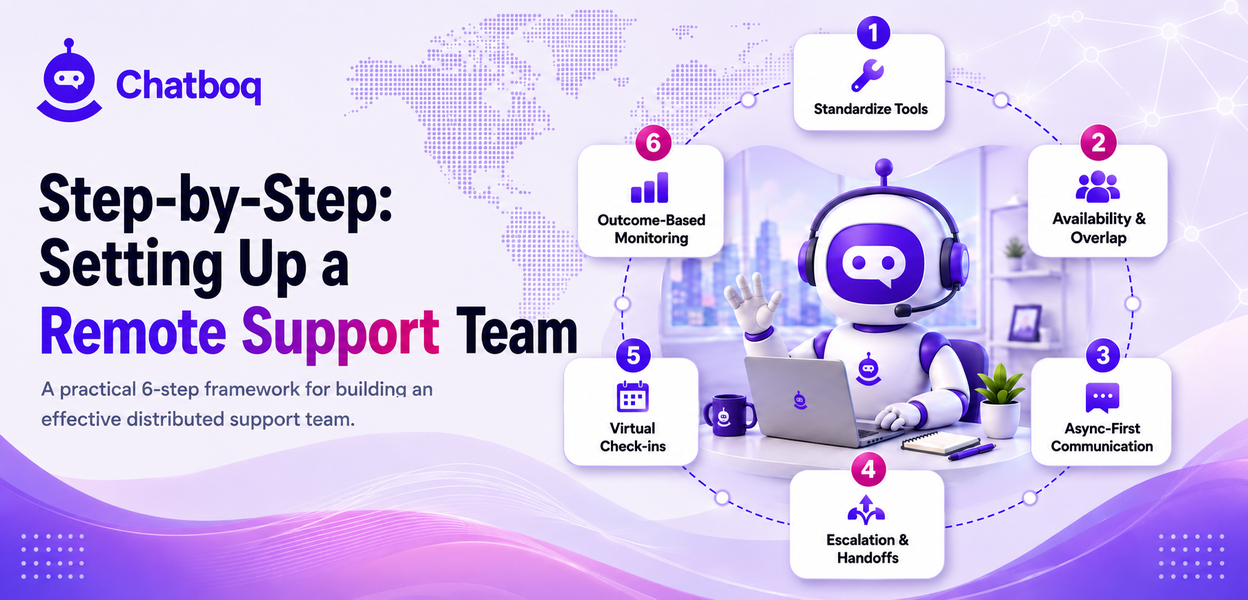
Setting up a remote team well involves standardizing tools before scaling hiring, clearly defining availability and overlap hours, building genuinely async-first communication habits, creating explicit escalation and handoff protocols, establishing regular virtual check-ins, and monitoring performance in a way that focuses on outcomes rather than surveillance.
Step 1: Standardize tools before hiring remotely
Settling on a consistent, well-documented tool stack before scaling remote hiring prevents the fragmentation that comes from each new hire adopting their own preferred tools independently.
Step 2: Define availability and overlap hours
Explicitly defining required overlap hours where the whole team, or at least key members, are simultaneously available prevents the coordination gaps that can otherwise emerge across a team spanning multiple time zones.
Step 3: Build async-first communication habits
Defaulting to written, asynchronous communication for anything that doesn't genuinely require a live conversation respects that not every team member is online at the same moment, and it also creates a searchable record everyone can reference later.
Step 4: Create clear escalation and handoff protocols
A remote team especially needs explicit, documented handoff protocols for passing a conversation or issue between agents in different time zones, since the informal in-person handoff an office team relies on simply isn't available.
Step 5: Set up regular virtual check-ins
Scheduled one-on-ones and team meetings, held consistently despite the lack of natural in-person touchpoints, keep a remote team connected and give managers regular visibility into how individual agents are actually doing.
Step 6: Monitor performance without micromanaging
Tracking genuine outcome metrics, resolution quality, customer satisfaction, rather than granular activity monitoring respects remote agents' autonomy while still maintaining real accountability for actual results.

 ChatGPT
 Perplexity
 Claude







Leave a Comment
Your email address will not be published. Required fields are marked *
By submitting, you agree to receive helpful messages from Chatboq about your request. We do not sell data.