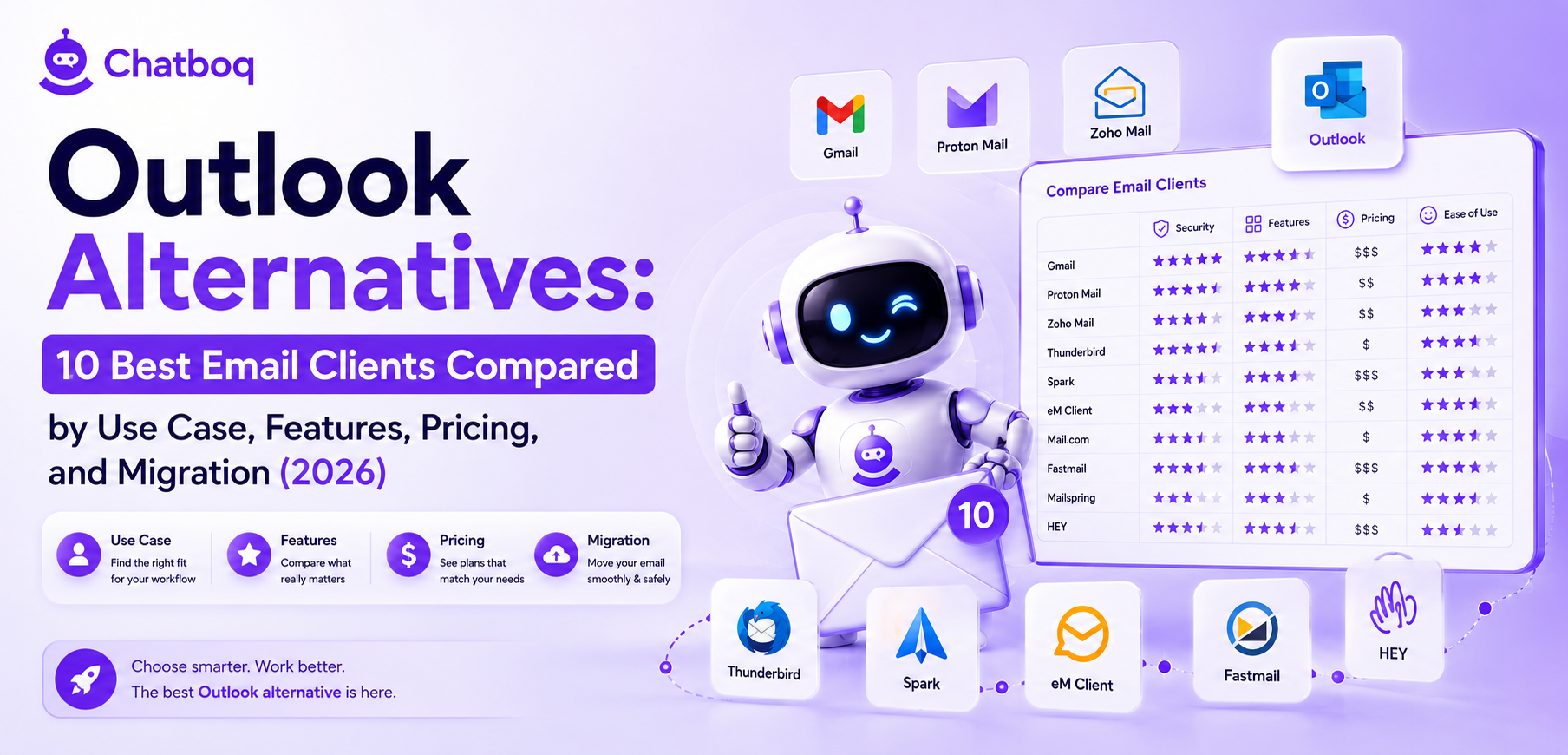
Best Outlook alternatives include Thunderbird, Spark, eM Client, Mailbird, Canary Mail, Mailspring, Proton Mail, Superhuman, Missive, and Front, each serving distinct needs from privacy and open-source use to AI, speed, and team collaboration workflows.
1. Thunderbird
Best for
Open-source users, Linux users, privacy-focused individuals, and users who need full local email storage with extensibility through add-ons.
Why people switch from Outlook to Thunderbird
Thunderbird costs nothing. It runs on Windows, macOS, and Linux equally. It stores email locally without cloud dependency. Privacy-focused users choose Thunderbird because it has no telemetry by default and no vendor data access to mailbox content.
Strengths
Full local email storage, OpenPGP encryption support natively, active add-on ecosystem, CalDAV and CardDAV calendar and contacts support through Thunderbird Calendar, and cross-platform consistency.
Limitations
No AI features. No modern thread-centric interface. The interface feels dated compared to Spark or Superhuman. Exchange support requires DavMail or a third-party gateway, adding setup complexity.
Exchange compatibility
Indirect. Thunderbird connects to Exchange through DavMail, an open-source gateway that translates Exchange protocols to IMAP and SMTP. This requires running DavMail as a local service, which adds setup overhead for non-technical users.
Migration difficulty
Medium. Thunderbird imports MBOX files and EML files. PST import requires conversion to MBOX format first using a third-party tool. IMAP migration from Outlook is straightforward.
Pricing
Free and open source under the Mozilla Public License.
2. Spark
Best for
Mac and iOS users who want a clean interface, AI email composition, and team collaboration features without the resource overhead of Outlook.
Why people switch from Outlook to Spark
Spark provides a modern email interface with AI features and team collaboration tools on Mac and iOS. Users on macOS who find Outlook's interface heavy or who want smart inbox features not available in older Outlook for Mac versions switch to Spark.
Strengths
AI email composition and summarization, smart inbox categorization, Spark for Teams shared drafts and internal email comments, clean thread view, and strong iOS integration with Apple Calendar and Contacts.
Limitations
No native calendar or contacts application. Exchange support is limited and less reliable than eM Client for corporate Exchange environments. No end-to-end encryption. Windows version is newer and less mature than the Mac version.
Exchange compatibility
Limited. Spark connects to Exchange via IMAP and SMTP but does not support Exchange Web Services fully. Corporate Exchange environments with EWS-required policies may not connect reliably.
Migration difficulty
Easy for IMAP accounts. Exchange migration requires verifying IMAP access is enabled on the Exchange server. No PST import support.
Pricing
Free for individuals. Spark for Teams starts at 9.99 USD per user per month.
3. eM Client
Best for
Windows users who need a full Outlook replacement with native Exchange support, integrated calendar and contacts, and one-time purchase pricing instead of a subscription.
Why people switch from Outlook to eM Client
eM Client mirrors Outlook's interface closely, reducing relearning. It provides native Exchange Web Services support without external gateways. Users who want Microsoft 365 compatibility without Microsoft 365 subscription cost choose eM Client.
Strengths
Native Exchange Web Services and Exchange ActiveSync support, integrated calendar and contacts via CalDAV and CardDAV, S/MIME and OpenPGP encryption, PST import support, and interface familiar to Outlook users.
Limitations
Free version supports only 2 accounts. macOS version lacks some features available on Windows. No AI email features. No shared inbox or team collaboration mode.
Exchange compatibility
Strong. eM Client connects to Exchange Online and on-premise Exchange Server using Exchange Web Services natively. No third-party gateway required.
Migration difficulty
Low. eM Client includes a built-in import wizard that handles PST files, MBOX, EML, and direct IMAP migration. PST import is the most reliable among the alternatives reviewed.
Pricing
Free for up to 2 accounts. Pro license at 49.95 USD one-time payment for personal use. Business licenses available.
4. Mailbird
Best for
Windows users who manage multiple email accounts and want a unified inbox with app integrations for tools like Slack, Google Calendar, and WhatsApp.
Why people switch from Outlook to Mailbird
Mailbird provides a faster, lighter Windows email client with a unified inbox that consolidates multiple accounts. Users who find Outlook too heavy or who manage accounts across multiple providers switch to Mailbird for its cleaner interface and app integration sidebar.
Strengths
Unified inbox for multiple accounts, app integration sidebar connecting to Google Calendar, Slack, WhatsApp, and Dropbox, fast search, and lightweight resource usage compared to Outlook.
Limitations
Windows only. No macOS or Linux support. No native Exchange Web Services. Calendar integration depends on Google Calendar rather than a native calendar. No end-to-end encryption.
Exchange compatibility
IMAP only. Mailbird connects to Exchange accounts through IMAP and SMTP but does not support Exchange Web Services or Exchange ActiveSync. Full Exchange feature sets including calendar sync through Exchange are not available.
Migration difficulty
Medium. IMAP migration is straightforward. PST import is not natively supported and requires converting PST to EML format first.
Pricing
Mailbird Personal starts at 3.25 USD per month billed annually.
5. Canary Mail
Best for
Mac and iOS users who want AI email features combined with end-to-end encryption and a clean interface.
Why people switch from Outlook to Canary Mail
Canary Mail combines AI writing assistance with S/MIME and OpenPGP encryption in one application. Users who need both AI productivity features and email privacy find this combination unavailable in Outlook without the Copilot add-on and separate encryption configuration.
Strengths
AI email composition and smart categorization, S/MIME and OpenPGP encryption, read receipts, send-later scheduling, focused inbox, and strong iOS integration.
Limitations
No native calendar. Exchange support is limited to IMAP connectivity. Windows version is in beta as of 2026. No shared inbox or team features.
Exchange compatibility
Limited to IMAP. Full Exchange Web Services support is not available in Canary Mail.
Migration difficulty
Easy for IMAP accounts. No PST import support.
Pricing
Free tier available. Canary Mail Pro costs approximately 20 USD per year.
6. Mailspring
Best for
Developers, Linux users, and individuals who want a fast, clean email client with open-source foundations and no subscription cost.
Why people switch from Outlook to Mailspring
Mailspring is free, runs on Windows, macOS, and Linux, and provides a modern interface that is faster than Thunderbird. Developers and open-source users who want a lightweight alternative without Thunderbird's dated interface choose Mailspring.
Strengths
Cross-platform support including Linux, fast performance, modern interface, open-source under GPL, link tracking, read receipts, and send-later scheduling.
Limitations
No calendar or contacts integration. No Exchange support. No end-to-end encryption. No shared inbox. Mailspring Pro subscription required for advanced features like snooze and send later.
Exchange compatibility
None. Mailspring supports IMAP and SMTP only. Exchange environments are not compatible.
Migration difficulty
Easy for IMAP accounts. Not suitable for Exchange migrations.
Pricing
Free and open source. Mailspring Pro at 8 USD per month adds advanced features.
7. Proton Mail
Best for
Privacy-first users who require end-to-end encryption by default and are willing to operate within the Proton ecosystem for email, calendar, and file storage.
Why people switch from Outlook to Proton Mail
Proton Mail provides zero-access encryption meaning Proton cannot read user email content. Users in sensitive industries, journalists, activists, and privacy-conscious individuals choose Proton Mail when data confidentiality is the primary requirement.
Strengths
End-to-end encryption using OpenPGP for all email between Proton users, zero-access architecture, Proton Calendar integration, Proton Drive for file storage, Swiss jurisdiction data hosting, and a functional free tier.
Limitations
No desktop email client. Proton Mail is a web application with mobile apps. No Exchange compatibility. No PST import. External email to non-Proton recipients requires password-protected links rather than standard encrypted delivery.
Exchange compatibility
None. Proton Mail operates as a standalone email provider outside the Microsoft ecosystem.
Migration difficulty
High. Proton Mail requires migrating to a new email address at proton.me or using a custom domain. Email migration from Outlook uses the Proton Mail Import-Export app via IMAP. No PST import.
Pricing
Free tier available. Proton Mail Plus starts at 4.99 USD per month.
8. Superhuman
Best for
Executives, founders, and professionals who receive high email volume and prioritize speed, keyboard shortcut efficiency, and AI-powered inbox management over feature breadth.
Why people switch from Outlook to Superhuman
Superhuman provides sub-100ms interface response, AI email summarization, split inbox, and keyboard-first navigation designed for users who process 100-plus emails daily. The primary switch trigger is speed and AI features that Outlook does not match without Copilot add-on cost.
Strengths
Industry-leading interface speed, AI summarization and one-click replies, split inbox prioritization, read status tracking, snooze and send-later, and keyboard shortcut navigation covering all primary actions.
Limitations
High cost at 30 USD per month. No calendar or contacts management. No desktop offline mode. Works only with Gmail and Microsoft accounts via IMAP. No shared inbox for team collaboration.
Exchange compatibility
IMAP only. Superhuman connects to Microsoft 365 and Exchange Online via IMAP. On-premise Exchange Server requires IMAP access to be enabled.
Migration difficulty
Low for IMAP accounts. High cost may require internal approval for business adoption.
Pricing
30 USD per user per month. No free tier.
9. Missive
Best for
Small to mid-size teams that manage shared inboxes for customer support, sales, or operations and need collaborative email triage with internal commenting and task assignment.
Why people switch from Outlook to Missive
Outlook shared mailboxes require delegate access configuration and lack internal commenting or task assignment on individual emails. Missive provides collaborative inbox management where team members can discuss emails internally, assign them, and resolve them without forwarding or CC chains.
Strengths
Shared inbox with internal comments, team email assignment, collision detection preventing duplicate replies, Exchange support, AI email composition, rule-based automation, and multi-channel inbox including SMS and WhatsApp.
Limitations
No free tier. More expensive than individual email clients. Not designed for personal email management. Mobile app has fewer features than desktop.
Exchange compatibility
Yes. Missive connects to Exchange Online and Exchange Server via Exchange Web Services. Full calendar sync through Exchange is supported.
Migration difficulty
Medium. IMAP migration is standard. Exchange connection requires server credentials and EWS endpoint configuration.
Pricing
Starts at 14 USD per user per month.
10. Front
Best for
Customer support teams, agencies, and enterprises that manage high-volume customer communication across email, chat, SMS, and social channels from a unified collaborative inbox.
Why people switch from Outlook to Front
Front provides a shared inbox platform designed for customer-facing teams. Unlike Outlook shared mailboxes, Front includes SLA management, CSAT tracking, AI reply drafting, routing rules, and performance analytics built into the email interface.
Strengths
Multi-channel shared inbox, AI drafting and summarization, SLA and CSAT analytics, team routing rules, CRM integrations, and a collaboration layer that makes customer email management measurable.
Limitations
High cost compared to individual email clients. Designed for teams, not individual users. Requires onboarding investment to configure routing rules and analytics correctly.
Exchange compatibility
Yes. Front connects to Exchange Online and Exchange Server. Calendar sync via Exchange is supported.
Migration difficulty
Medium. Email accounts connect via IMAP or Exchange. Historical email import is available but requires configuration for large mailboxes.
Pricing
Starts at 19 USD per user per month.

 ChatGPT
 Perplexity
 Claude






Leave a Comment
Your email address will not be published. Required fields are marked *
By submitting, you agree to receive helpful messages from Chatboq about your request. We do not sell data.