Popular free knowledge base software includes Freshdesk, Zoho Desk, Confluence, Notion, GitBook, BookStack, Wiki.js, DokuWiki, XWiki, and MkDocs with GitHub Pages. Each offers a different balance of ease of use, customization, hosting, and free plan limitations.
|
Tool
|
Type
|
Best For
|
Self-Hosted
|
AI Search
|
|
Freshdesk
|
Freemium SaaS
|
Small support teams
|
No
|
Limited
|
|
Zoho Desk
|
Freemium SaaS
|
Zoho ecosystem users
|
No
|
No
|
|
Confluence
|
Freemium SaaS
|
Internal team docs
|
No
|
Limited
|
|
Notion
|
Freemium SaaS
|
Startups, internal wikis
|
No
|
No
|
|
GitBook
|
Freemium SaaS
|
Product documentation
|
No
|
Limited
|
|
BookStack
|
Open source
|
Self-hosted internal KB
|
Yes
|
No
|
|
Wiki.js
|
Open source
|
Customizable self-hosted wiki
|
Yes
|
No
|
|
DokuWiki
|
Open source
|
Lightweight no-database wiki
|
Yes
|
No
|
|
XWiki
|
Open source
|
Enterprise self-hosted KB
|
Yes
|
No
|
|
MkDocs + GitHub Pages
|
Developer-hosted
|
Technical documentation
|
Yes
|
No
|
1. Freshdesk (Free Plan)
Freshdesk is a help desk platform with an integrated knowledge base module, combining ticketing and self-service documentation in one free-tier product.
Free plan overview
The free plan supports up to 10 agents with a basic knowledge base, article publishing, and simple search included at no cost.
Key features
Article categorization, basic search, ticket deflection suggestions, and integration with Freshdesk's free help desk ticketing system.
Free limitations
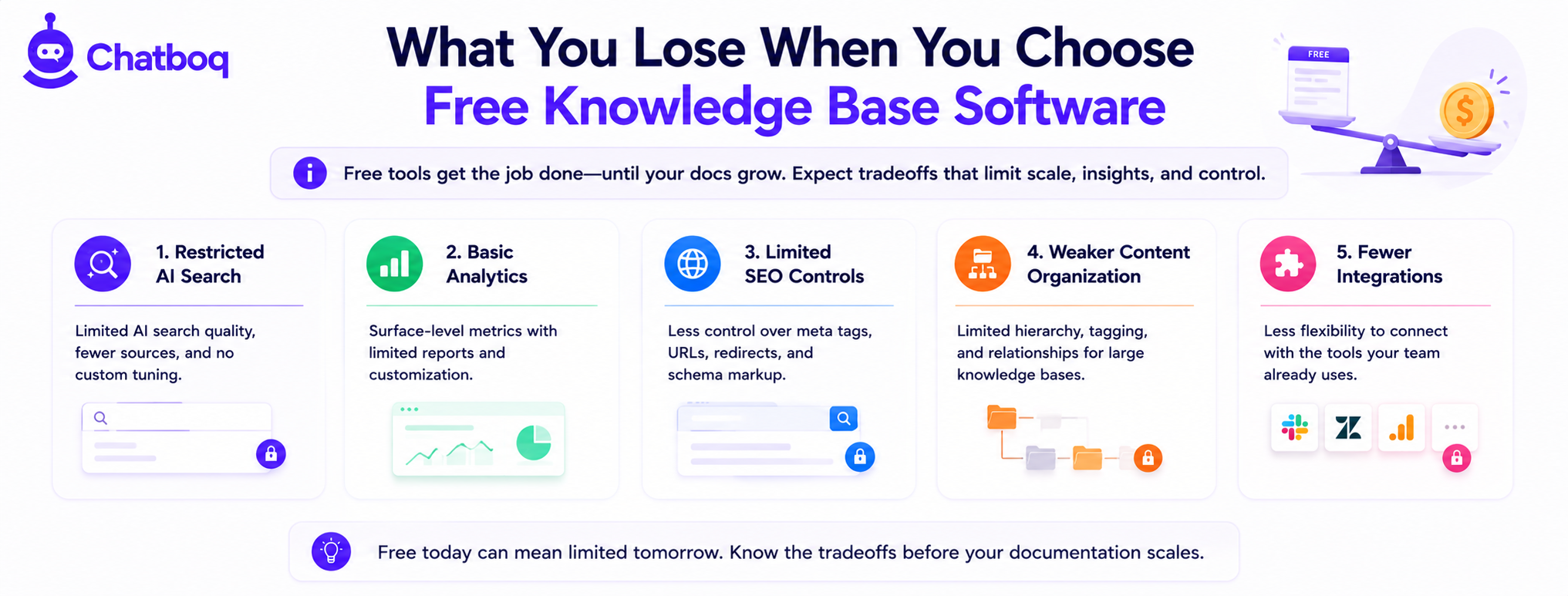
No advanced analytics on search behavior, limited customization of the help center's design, and no AI-powered search on the free tier.
Best for
Small support teams wanting an integrated help desk and knowledge base without separate tools or upfront cost.
2. Zoho Desk (Free Plan)
Zoho Desk offers a free help desk tier with basic knowledge base functionality, fitting naturally for teams already using other Zoho products.
Free plan overview
The free plan supports up to 3 agents with a basic knowledge base and email ticketing included at no cost.
Key features
Article publishing, basic categorization, and native integration with Zoho CRM and other Zoho ecosystem tools.
Free limitations
Low agent cap limits scaling beyond very small teams, and advanced search and AI features require paid upgrades.
Best for
Small teams already invested in the Zoho ecosystem wanting basic knowledge base functionality without additional tool cost.
3. Confluence (Free Plan)
Confluence is Atlassian's collaboration and documentation platform, commonly used for internal knowledge bases and team wikis rather than public customer support.
Free plan overview
The free plan supports up to 10 users with unlimited pages and basic page organization included at no cost.
Key features
Rich page editing, nested page structures, templates, and integration with Jira for engineering and product documentation.
Free limitations
User cap of 10 restricts scaling, and advanced permissions, analytics, and automation require paid tiers.
Best for
Small internal teams documenting processes, especially those already using Jira for project tracking.
4. Notion (Free Plan)
Notion is a flexible workspace tool frequently used as an internal knowledge base or lightweight public-facing help center through shared pages.
Free plan overview
The free plan for individuals includes unlimited pages and blocks, with team plans offering limited free collaboration for small groups.
Key features
Flexible page structures, databases, templates, and the ability to publish pages publicly as a simple help center.
Free limitations
No purpose-built search optimization for support use cases, no ticket deflection analytics, and team collaboration limits on the free tier.
Best for
Startups and small teams wanting a flexible internal wiki without committing to dedicated knowledge base software.
5. GitBook (Free Plan)
GitBook is a documentation platform popular for product and API documentation, offering a clean reading experience for technical content.
Free plan overview
The free plan supports public documentation sites with unlimited pages for open-source or small projects at no cost.
Key features
Clean documentation formatting, version control integration, and a polished reading experience suited for product documentation.
Free limitations
Limited customization on the free tier, and private documentation spaces require a paid plan.
Best for
Product and engineering teams documenting APIs or technical products who want a polished public-facing format.
6. BookStack (Open Source)
BookStack is a self-hosted, open-source knowledge base organized around books, chapters, and pages, designed specifically for documentation rather than general note-taking.
Setup model (self-hosted)
BookStack requires a server or VPS hosting provider and basic installation, typically using Docker for simplified deployment.
Key features
Structured book and chapter organization, built-in search, user permissions, and a clean, purpose-built documentation interface.
Limitations
Requires technical setup and ongoing server maintenance, and lacks AI-powered search or advanced analytics natively.
Best for
Technical teams comfortable with self-hosting who want a purpose-built, permanently free knowledge base structure.
7. Wiki.js (Open Source)
Wiki.js is a modern, self-hosted wiki platform with a clean interface and extensive customization options for internal documentation.
Setup model
Wiki.js requires self-hosting via Docker or a Node.js environment, with moderate technical setup complexity.
Key features
Markdown and visual editing, version history, customizable themes, and support for multiple authentication methods.
Limitations
Requires ongoing hosting and updates, and lacks built-in AI search or support-specific analytics.
Best for
Technical teams wanting a highly customizable, modern-feeling self-hosted wiki for internal documentation.
8. DokuWiki (Open Source)
DokuWiki is a lightweight, file-based wiki that requires no database, simplifying setup and maintenance compared to database-driven alternatives.
Setup model
DokuWiki installs on basic PHP hosting without requiring a separate database, reducing hosting complexity and cost.
Key features
Simple plain-text storage, built-in access control, and a large plugin ecosystem for extending functionality.
Limitations
Dated default interface compared to modern alternatives, and file-based storage can complicate scaling for very large content volumes.
Best for
Teams wanting the simplest possible self-hosted setup without database administration overhead.
9. XWiki (Open Source)
XWiki is an enterprise-oriented open-source wiki platform with structured data capabilities beyond standard wiki page editing.
Setup model
XWiki requires a Java-based server environment and database, representing a more involved setup than lighter alternatives like DokuWiki.
Key features
Structured data and application building within wiki pages, granular permissions, and enterprise-grade extensibility.
Limitations
Steeper setup and learning curve than BookStack or Wiki.js, requiring more technical investment to deploy and maintain.
Best for
Larger technical teams needing enterprise-grade self-hosted knowledge management with structured data capabilities.
10. MkDocs + GitHub Pages (Free Self-Hosted)
MkDocs is a static site generator for documentation, commonly paired with GitHub Pages for free hosting, producing a fully free technical documentation site.
Setup model
Documentation is written in Markdown, built into static HTML using MkDocs, and hosted free on GitHub Pages connected to a GitHub repository.
Key features
Fast static page loading, version control through Git, and a large theme ecosystem including the popular Material for MkDocs theme.
Limitations
Requires Git and command-line familiarity, and lacks built-in dynamic search analytics or ticket deflection tracking.
Best for
Developer teams already using GitHub who want a fully free, version-controlled technical documentation site.

 ChatGPT
 Perplexity
 Claude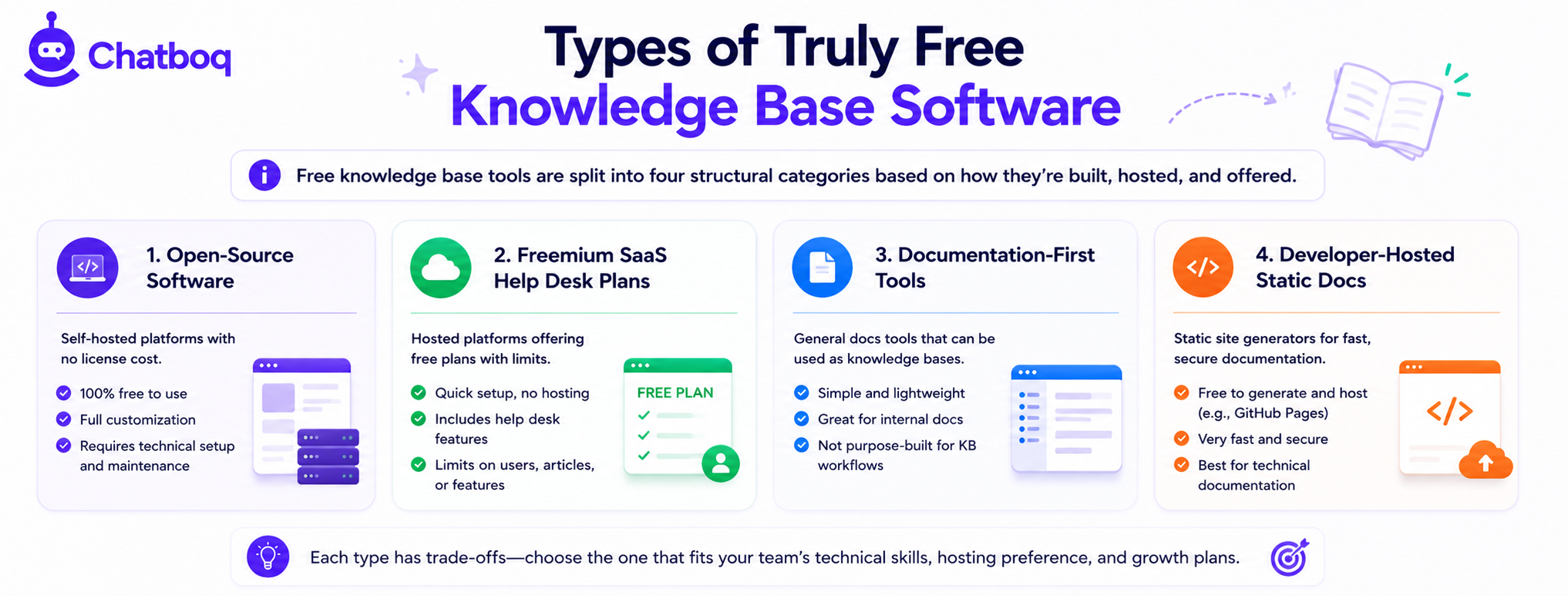






Leave a Comment
Your email address will not be published. Required fields are marked *
By submitting, you agree to receive helpful messages from Chatboq about your request. We do not sell data.