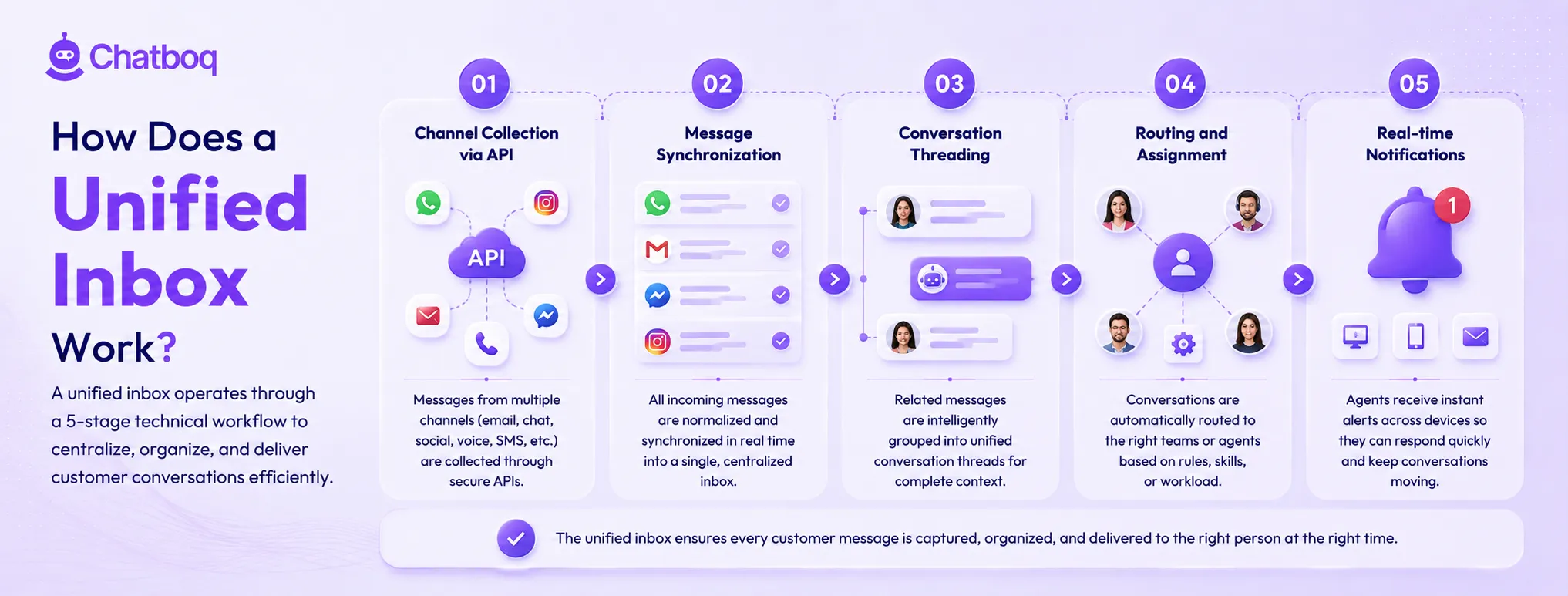
A unified inbox operates through a 5-stage technical workflow: channel collection via API, message synchronization, conversation threading, routing and assignment, and real-time notifications.
How Are Messages Collected from Different Channels?
Message collection works through API integrations and webhooks that connect communication channels to the unified inbox platform. Email connects through IMAP or SMTP integrations, while WhatsApp, Facebook Messenger, and Instagram DM connect through platform APIs like the Meta Graph API. Live chat messages enter through the chat system’s messaging infrastructure. Each incoming message triggers an event that the unified inbox processes, identifies, and routes into the centralized queue.
How Does Message Synchronization Work?
Message synchronization copies conversation data from connected communication channels into the unified inbox database in real time or near real time. When a customer sends a message through WhatsApp, email, or live chat, the platform receives the data, processes it, stores it centrally, and displays it in the agent dashboard within seconds. Synchronization also works bidirectionally, meaning replies sent from the unified inbox are delivered back through the original channel.
How Are Conversations Grouped into a Single Thread?
Conversation threading combines messages from the same customer into one continuous conversation history, even when messages come from different channels like email, WhatsApp, or live chat. The unified inbox matches customer identity using email addresses, phone numbers, account IDs, or other identifiers to connect new messages to existing records. This gives agents complete conversation context across channels. Threading problems occur when customers use different contact details on different platforms, preventing the system from automatically matching conversations to the correct customer profile.
How Does Routing and Assignment Work in Unified Inboxes?
Conversation routing assigns incoming messages to the appropriate agent or team based on configured rules. Rule-based routing evaluates message attributes (channel origin, customer account tier, conversation category, keyword content) and applies assignment logic: billing inquiries route to the billing team, WhatsApp messages from enterprise accounts route to dedicated agents. Skills-based routing assigns conversations to agents with matching expertise. Round-robin distribution balances assignments across available agents. AI-powered routing classifies intent from message content and routes based on inferred topic rather than channel or keyword rules.
How Do Notifications and Real-Time Updates Work?
Real-time notifications alert agents to new incoming conversations, assignment events, customer replies on active conversations, and mentions in internal notes. Notification configuration controls alert frequency: agents receiving notifications for every incoming message across all channels experience fatigue in high-volume operations. Effective notification design prioritizes alerts for assigned conversations, direct mentions, and SLA proximity events over general inbox volume alerts. Dashboard real-time updates display conversation queue status, agent availability, and active conversation counts without manual refresh.

 ChatGPT
 Perplexity
 Claude



Leave a Comment
Your email address will not be published. Required fields are marked *
By submitting, you agree to receive helpful messages from Chatboq about your request. We do not sell data.