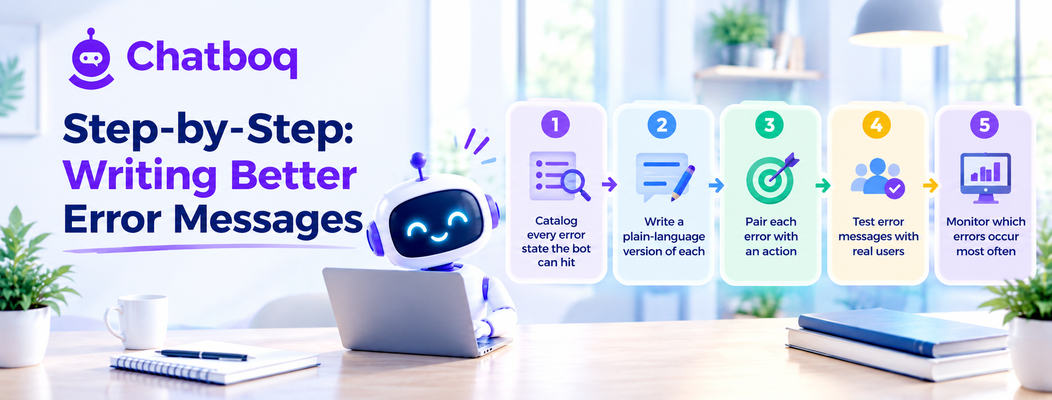
Improving a bot's error messages works best as a five-step process: cataloging every distinct error state the bot can actually hit, writing a plain-language version of each one, pairing every error with a specific actionable next step, testing the messages with real users, and monitoring which errors occur most often to prioritize further refinement.
Step 1: Catalog every error state the bot can hit
Pulling a complete list of every distinct failure state the bot's underlying system can generate, connection failures, no results, unrecognized input, timeout errors, gives a clear, comprehensive starting point rather than only addressing the handful of errors that happen to come to mind first.
Step 2: Write a plain-language version of each
Working through the full catalog and rewriting each technical error state into a short, plain-language customer-facing version ensures no failure mode is left showing a raw, unhelpful default message to a real customer.
Step 3: Pair each error with an action
For every error message, deliberately deciding on the specific next step it should offer, retry, rephrase, wait, escalate, ensures the message is functionally useful and not just apologetic in tone without actually helping the customer move forward.
Step 4: Test error messages with real users
Deliberately triggering each error state with real test users, rather than only reviewing the wording internally, reveals which messages genuinely read as clear and reassuring versus which ones still leave a tester confused about what actually happened or what to do.
Step 5: Monitor which errors occur most often
Tracking which specific error states occur most frequently in real usage highlights where refinement effort delivers the most value, and a persistently high-frequency error is often also a signal of an underlying technical issue worth fixing at the source rather than only smoothing over in the messaging.

 ChatGPT
 Perplexity
 Claude







Leave a Comment
Your email address will not be published. Required fields are marked *
By submitting, you agree to receive helpful messages from Chatboq about your request. We do not sell data.