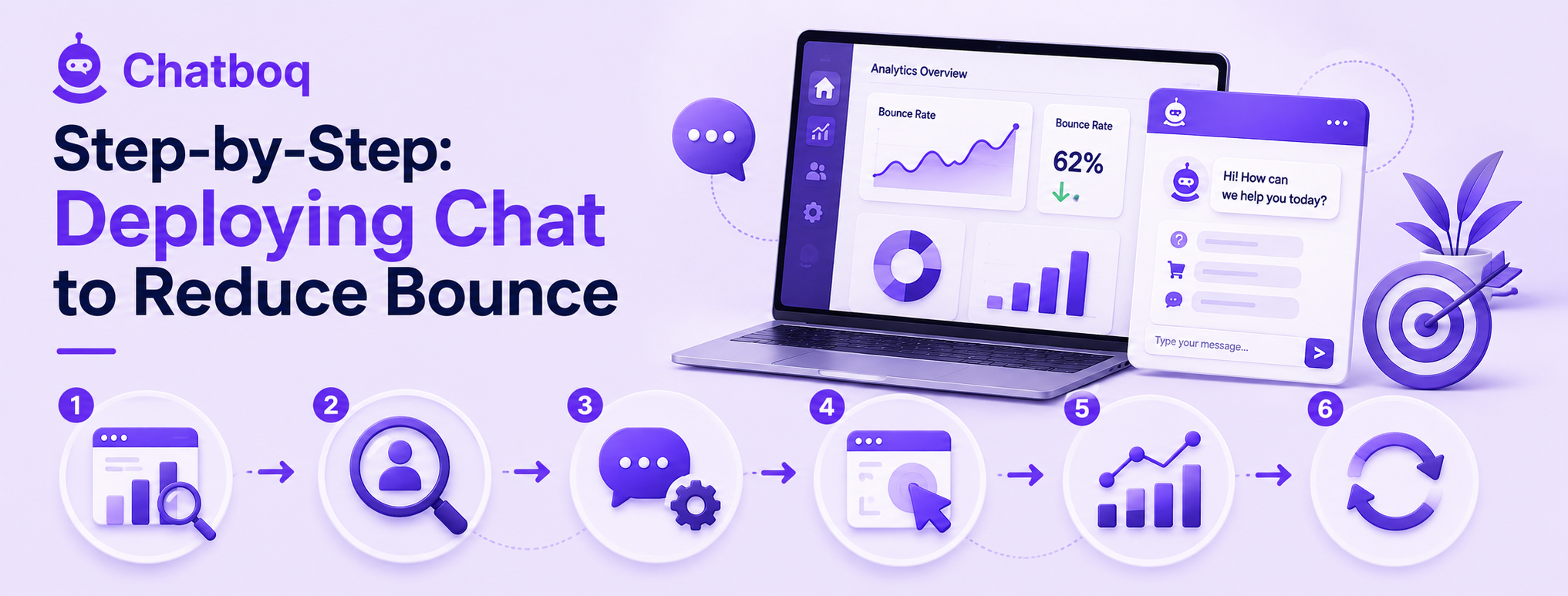
Deploying chat well for bounce reduction involves identifying the highest-bounce pages first, genuinely diagnosing why visitors are actually bouncing on those specific pages, configuring chat specifically for that diagnosed cause, setting thoughtful exit-intent triggers, measuring bounce rate before and after deployment, and iterating on prompt timing and copy based on results.
Step 1: Identify your highest-bounce pages
Starting with the pages already showing the highest bounce rates focuses limited effort where the potential improvement, and the ability to measure it clearly, is greatest.
Step 2: Diagnose why visitors are bouncing
Investigating the likely cause of high bounce on a specific page, through existing analytics, user testing, or even a first round of chat conversations themselves, before configuring chat ensures the deployment actually addresses the real underlying issue.
Step 3: Configure chat specifically for those pages
Tailoring the chat prompt and available responses to the diagnosed cause of bounce on that specific page, rather than deploying a generic configuration everywhere, ensures the chat experience is genuinely relevant to what's actually driving visitors away.
Step 4: Set exit-intent triggers thoughtfully
Configuring exit-intent detection to fire at a genuinely appropriate moment, and with messaging tailored to the specific page, maximizes the chance of catching and re-engaging a visitor right before they'd otherwise leave.
Step 5: Measure bounce rate before/after
Comparing bounce rate on the target pages before and after chat deployment gives the clearest, most direct confirmation of whether the intervention is actually working as intended.
Step 6: Iterate on prompt timing and copy
Treating the initial deployment as a starting point rather than a finished configuration, and continuing to refine timing and copy based on actual results, tends to produce meaningfully better outcomes over time than a set-and-forget approach.

 ChatGPT
 Perplexity
 Claude



Leave a Comment
Your email address will not be published. Required fields are marked *
By submitting, you agree to receive helpful messages from Chatboq about your request. We do not sell data.