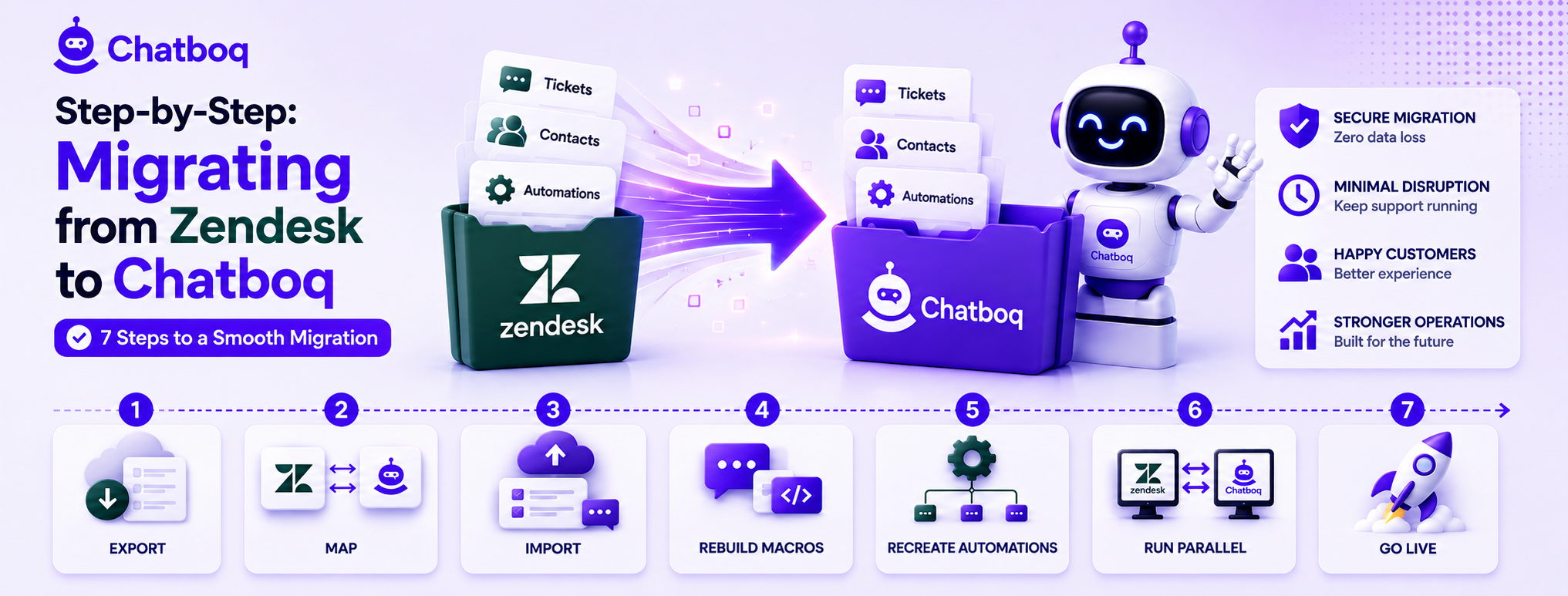
A full migration typically follows seven steps: exporting Zendesk data, mapping Zendesk fields to their Chatboq equivalents, importing historical tickets and conversations, migrating canned responses and macros, recreating automation and routing logic, running both systems in parallel briefly, and finally cutting over and redirecting live channels.
Step 1: Export your Zendesk data
Zendesk provides built-in export tools for tickets, users, and organizations, and starting with a complete, clean export is the foundation the rest of the migration depends on.
Step 2: Map Zendesk fields to Chatboq fields
Creating a clear mapping between each Zendesk field and its Chatboq equivalent, including flagging any fields with no direct match, prevents data from being silently dropped or misplaced during import.
Step 3: Import historical tickets and conversations
Importing the exported ticket history into Chatboq, following the field mapping established in the previous step, should be followed by a spot-check of a sample of imported tickets to confirm data landed correctly.
Step 4: Migrate canned responses and macros
Canned responses and macros generally need to be manually recreated or reformatted for the new platform, since exact automatic translation between platforms' differing structures is rarely available out of the box.
Step 5: Recreate automation rules and routing logic
Automation and routing rules almost always need to be rebuilt natively in the new platform rather than directly imported, since the underlying logic structures differ meaningfully between most help desk systems.
Step 6: Run both systems in parallel briefly
A short parallel-run period, with new conversations flowing into Chatboq while Zendesk remains accessible for reference, catches migration gaps before the team is fully dependent on the new system alone.
Step 7: Cut over and redirect channels
Once the parallel period confirms everything is working correctly, redirecting live channels, chat widget, email routing, and any integrations, fully to Chatboq completes the migration.

 ChatGPT
 Perplexity
 Claude



Leave a Comment
Your email address will not be published. Required fields are marked *
By submitting, you agree to receive helpful messages from Chatboq about your request. We do not sell data.